Back to projects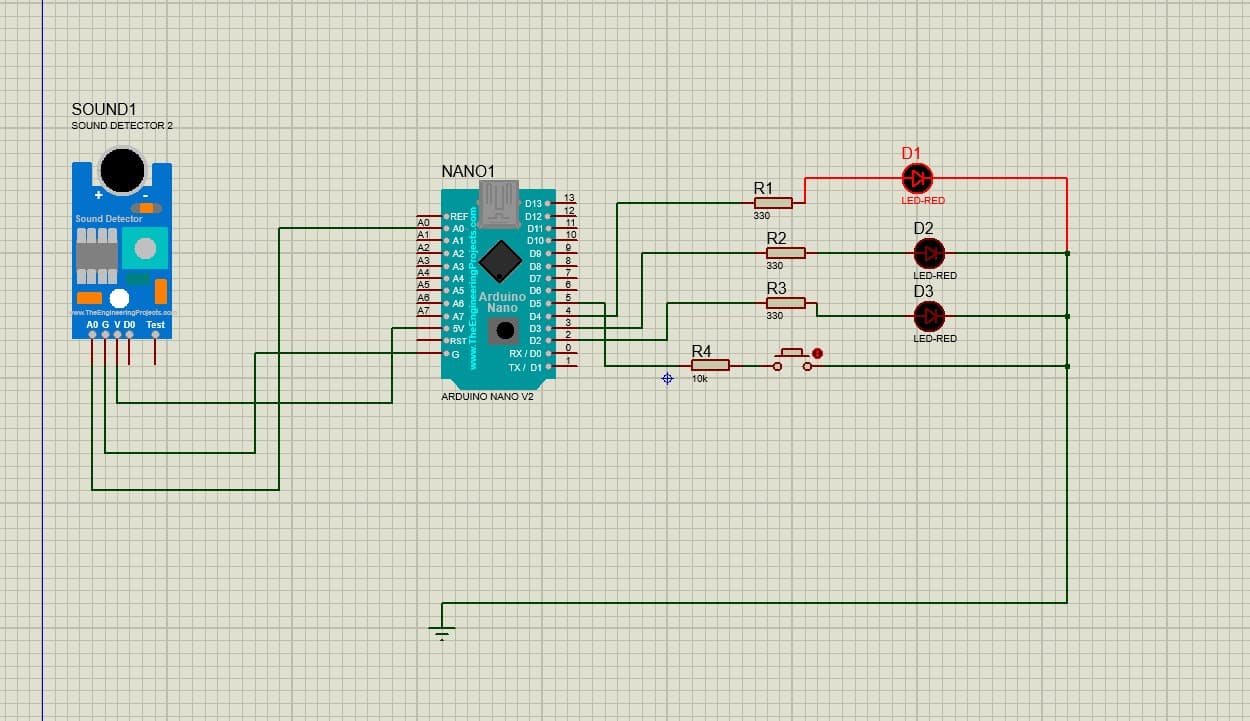
Smart Coconut Beetle Detection System
Madhuka Malshan / July 7, 2025
Introduction
The Smart Coconut Beetle Detection System is a robotics project designed to help farmers detect rhinoceros beetle activity inside coconut trees. The system uses an Arduino Nano and a vibration sensor to identify beetle sound patterns and alert the user through LED indicators. This provides an affordable and eco-friendly way to prevent early crop damage.
Features
- Real-time Vibration Detection – Captures beetle activity using an LM386 vibration/sound sensor.
- Alert System with LEDs –
- Blue → System ON
- Yellow → Suspected activity
- Red → Confirmed detection
- Signal Analysis – Detects sound frequencies within the beetle activity range (700–1400 Hz).
- Reset Button – Quickly clears alerts and restarts monitoring.
- Low-Cost & Eco-Friendly – Designed to be affordable for farmers.
Technologies Used
- Microcontroller: Arduino Nano
- Sensors: LM386 vibration/audio sensor
- Programming: Arduino C/C++
- Power: Rechargeable battery (solar option supported)
- Hardware: Breadboard, LEDs, resistors, weather-safe casing
Project Structure
The system is built using these main modules:
- Sensor Module – Collects vibration signals.
- Signal Processing Module – Filters noise and checks frequency patterns.
- Alert Module – Controls LED indicators based on detection levels.
- Reset Module – Handles manual reset input.
Installation / Setup
This is a hardware-based project. Below is a basic setup guide:
Requirements
- Arduino Nano
- LM386 vibration sensor
- 3 LEDs (Blue, Yellow, Red) + resistors
- Jumper wires
- Push button (Reset)
- Battery pack
Steps
- Connect the vibration sensor to the Arduino analog input.
- Wire LEDs to digital pins for alert indicators.
- Add the reset button to a digital interrupt pin.
- Upload the Arduino code using the Arduino IDE.
- Mount the device in a weather-safe enclosure.
Usage
Once the device is powered on:
- Blue LED indicates the system is running.
- The sensor continuously monitors tree vibrations.
- If beetle-like patterns are detected → Yellow LED.
- Repeated detections trigger the Red LED (confirmed alert).
- Press the reset button to clear alerts and restart monitoring.
Testing
- Tested with simulated beetle sound patterns.
- Tuned sensitivity to reduce false positives.
- Ran multiple duration tests for stability.
- Verified alert sequence under controlled vibration inputs.
Future Enhancements
- Add Wi-Fi/GSM for mobile alerts.
- Build a mobile app dashboard for real-time monitoring.
- Use Machine Learning for sound classification.
- Create a multi-sensor version for larger plantations.