Unleashing Agentic AI: Build Smart, Adaptive Workflows Without Code
Madhuka Malshan / July 25, 2025
🤖 Introduction to Agentic AI
In the age of intelligent automation, Agentic AI steps in as your virtual assistant — capable of reasoning, remembering, and adapting. Whether you're managing personal routines, customer queries, or business workflows, Agentic AI brings autonomy to your tasks.
Let’s dive in and discover how to turn static tools into dynamic, intelligent agents.
🧩 What Is an Agent?
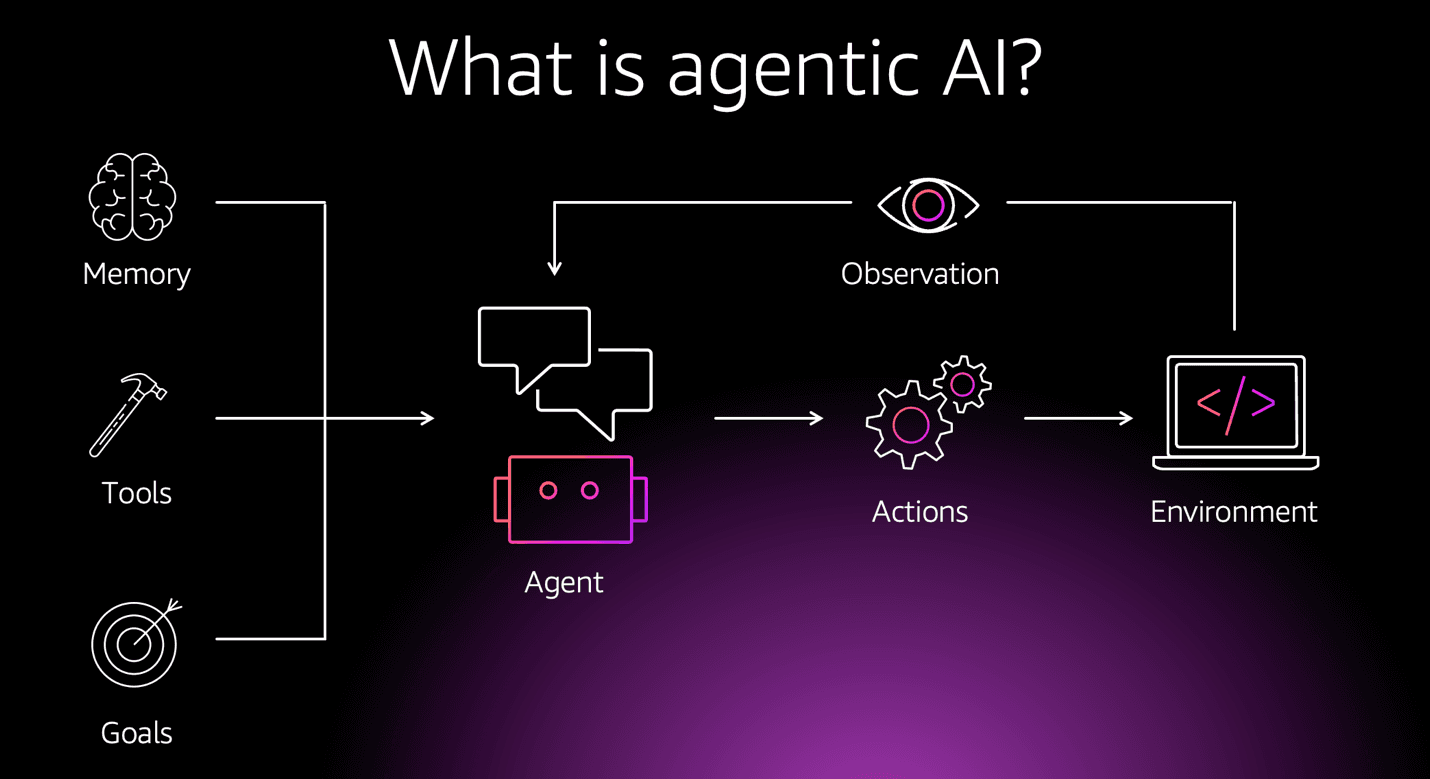
An AI Agent is a self-directed, goal-driven unit that can:
- Observe inputs (from APIs, sensors, users)
- Think and decide (based on rules, models, or memory)
- Act (send messages, create files, trigger workflows)
Example:
A "Travel Assistant Agent" books flights, checks weather, and alerts delays — all autonomously.
🔄 Task Automation with Agentic AI
Agentic AI supports step-based and multi-agent workflows. Here's how a typical flow might look:
🗓️ Example: Meeting Scheduler Agent
1. Receive request: "Schedule a meeting with Alice"
2. Check calendar availability
3. Find open time slots
4. Send email invitation
5. Log event in Notion
This logic can be built using platforms like n8n, LangChain, or AutoGen, powered by Agentic AI models.
🧠 Memory & Context Awareness
Agents can remember past interactions and decisions.
🧬 Example: Memory Store
{
  "user": "Madhu",
  "lastMeetingWith": "Alice",
  "preferredTime": "Afternoon"
}
The agent uses this memory to personalize future decisions — "Would you like to meet Alice again this afternoon?"
🔗 Agent Chaining
Complex workflows are made of interlinked agents:
EmailReaderAgent→ Extracts upcoming deadlinesDeadlineManagerAgent→ Logs tasks to NotionReminderAgent→ Sends alerts 24 hours before
Each agent passes state and intent to the next.
⚙️ Tools & Integration
Agents are modular. Each has tools — API connectors or code-based functions.
🔧 Examples:
GoogleCalendarTool— Manage eventsOpenWeatherTool— Fetch forecastsPythonTool— Execute calculations
Use tools with structured inputs, e.g.:
{
  "tool": "OpenWeatherTool",
  "location": "Colombo"
}
🧪 Decision-Making & Reasoning
Agents can evaluate if-else logic, make ranking decisions, or even summarize long documents using LLMs.
if (user.meeting_count > 3 && user.is_tired) {
    suggestBreak();
}
🧠 Many systems use LLM + rules + memory for robust logic.
🔐 Permissions & Safety
Good agents ask before acting.
🔐 Example: Before sending an email
🛑 “May I send this invite to Alice at 3 PM?”
You can control this using:
- Approval gates
- Action validation rules
- Audit trails
🔁 Looping & Recursion
Some agents re-evaluate until a goal is achieved.
Example:
- Retry API calls until response is
200 OK - Ask follow-up questions until enough data is gathered
🌍 Real-World Use Cases
✅ Personal Productivity ✅ Customer Support Agents ✅ Data Processing Pipelines ✅ Sales Follow-ups ✅ Social Media Automation ✅ Smart IoT Control
🔧 Popular Agent Frameworks
- 🧠 LangChain
- 🔁 AutoGen (Microsoft)
- 🛠️ CrewAI
- 🧰 SuperAgent
- 🌐 n8n / Zapier (with AI nodes)
Each framework has its own syntax, tool definitions, and capabilities.
🔍 Debugging & Logs
Just like a console, logs are crucial.
Log what the agent sees, thinks, and does:
console.log("Input from user:", user_input);
console.log("Agent decision:", decision_tree);
Use platforms with agent tracing like LangSmith, PromptLayer, or WandB.
💡 Pro Tips
✅ Give agents clear goals
✅ Define safe tools with validations
✅ Store context in memory stores
✅ Use user feedback loops
✅ Prefer composable agents for scale
🚫 Common Pitfalls
❌ Letting agents run infinite loops
❌ Missing tool validation
❌ Confusing prompts or goals
❌ Hardcoding user data instead of memory
❌ No fallback or manual override